Five things you can do with Claude this week, plus how to set it up from scratch, with real screenshots from my own account. No prompt engineering. No tech background. Just copy the prompts and go.
Inbox + calendarProperty websiteOpen house flyerClient follow-upsListing presentation
Do this once. It turns Claude from a chatbot into an assistant that can actually work for you. These are the exact screens from the walkthrough.
1
Get the desktop app
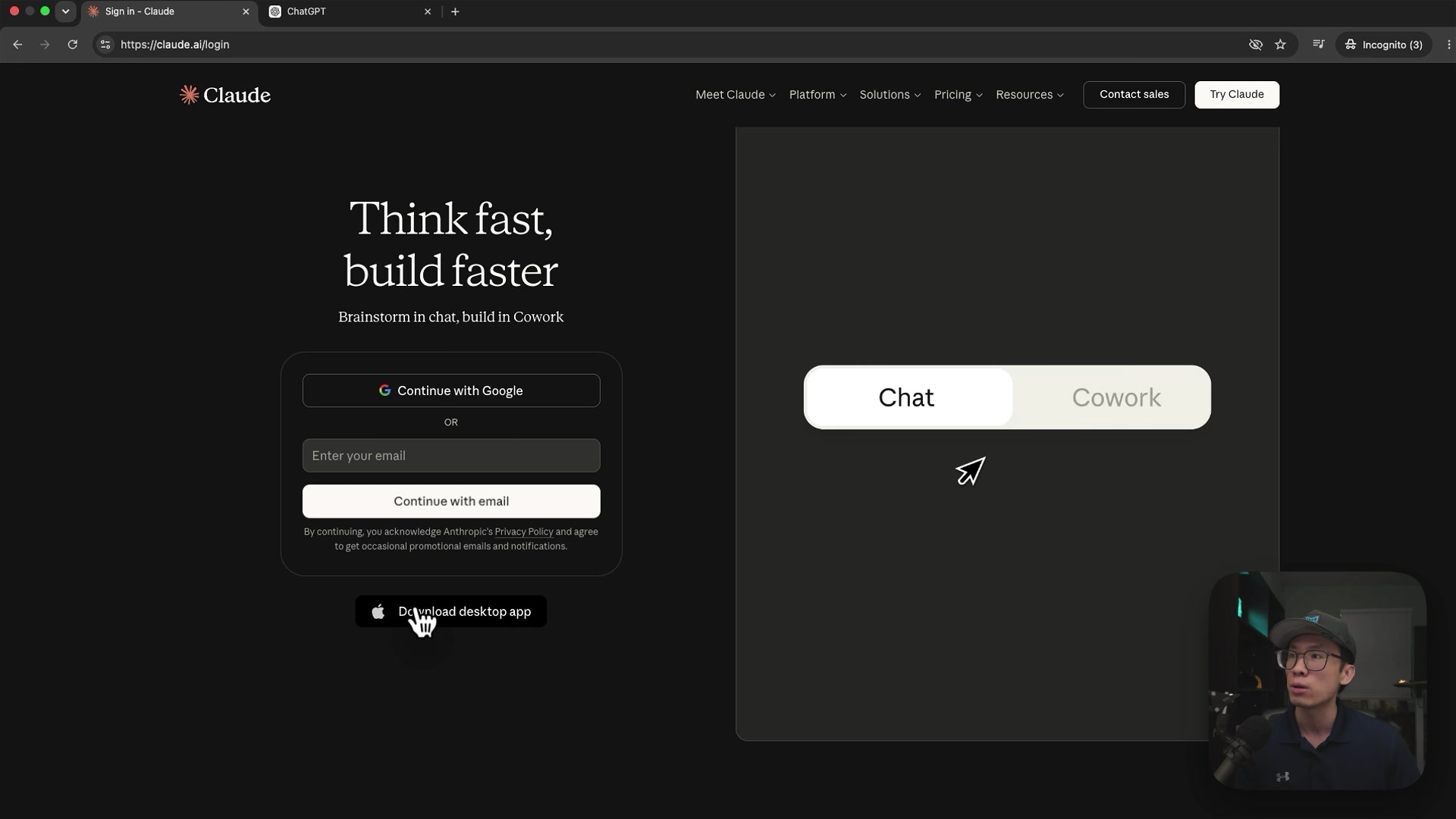
Go to claude.ai, sign up, and click Download desktop app. The desktop app is where Claude gets powerful, it can act on your computer and the web, not just chat. For daily real-estate use, upgrade to Claude Pro (about $20/mo) for connectors and real usage.
claude.ai, sign up, then download the desktop app.
2
Just talk to it in plain English
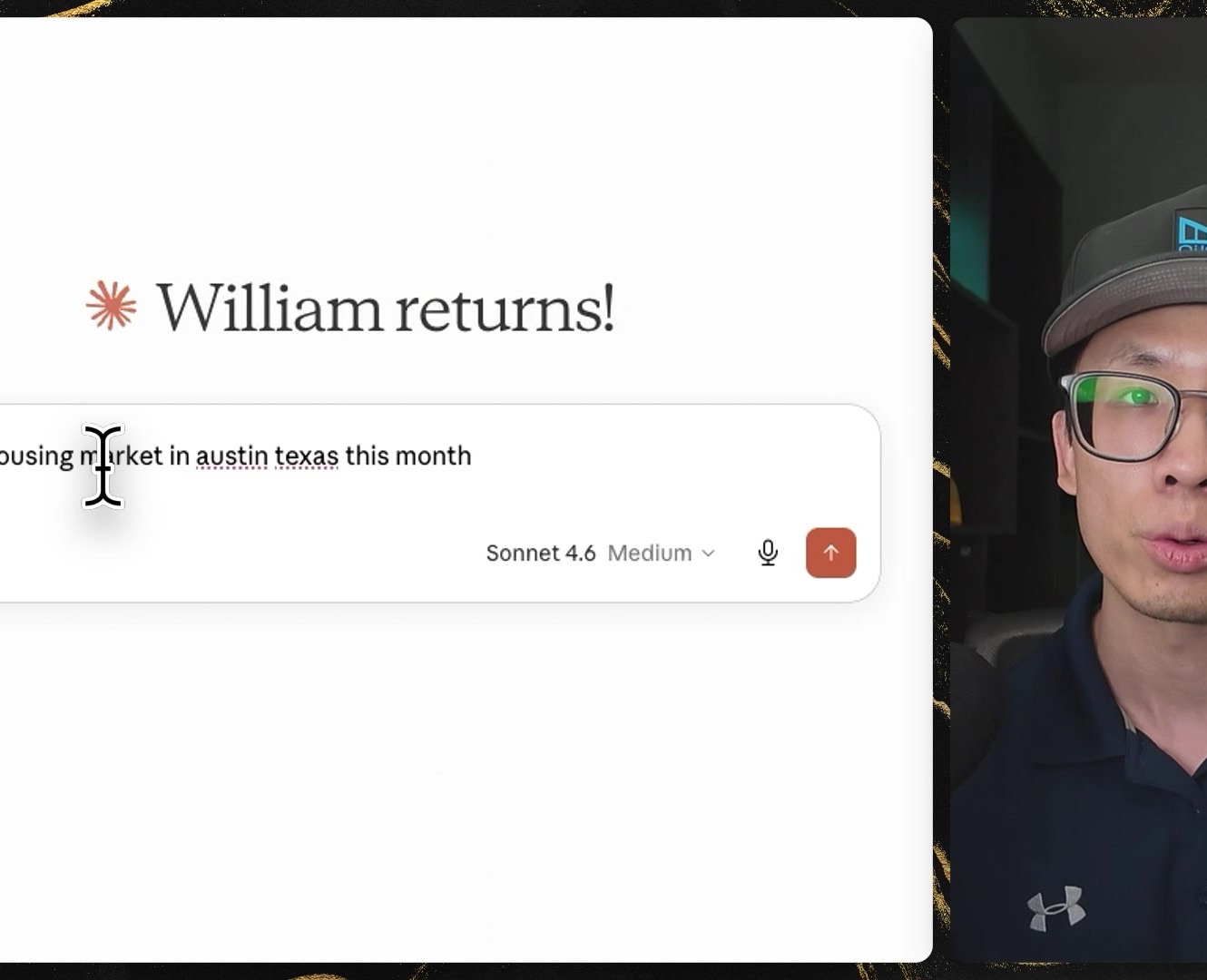
Open a chat and ask like you'd ask a sharp assistant: "How is the housing market in Austin this month?" There are three workspaces: Chat to ask and answer, Cowork to let it use your tools and take action, and Code for full-power builds like a listing website. You'll mostly live in Chat and Cowork.
Ask in plain English, no special prompts required.
3
Pick the right model
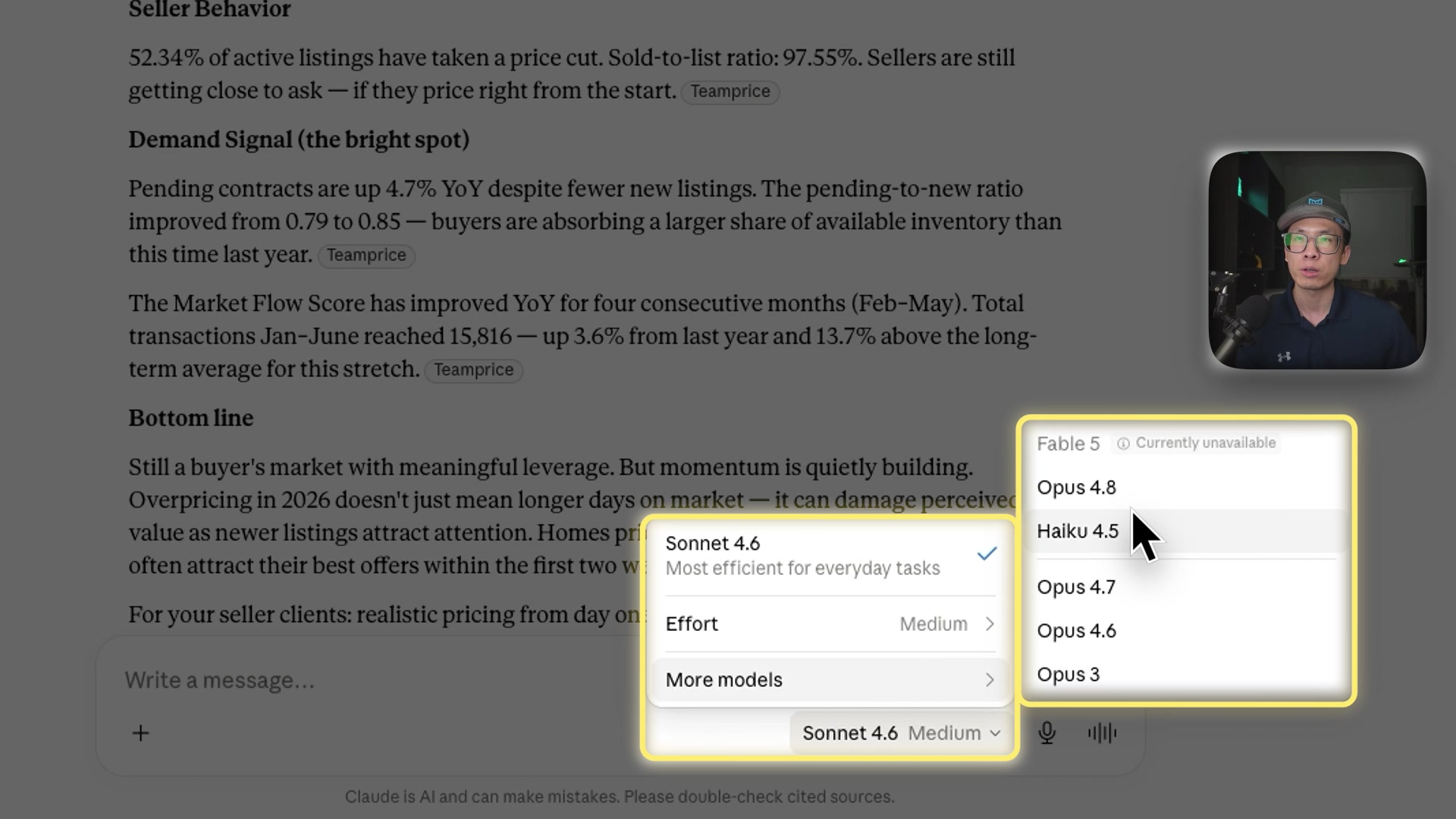
Think of the models like hires. Haiku is the fast assistant, Sonnet is the experienced manager (your daily driver), Opus is the expert you bring in for hard problems. Effort tells Claude how hard to think. Higher model + higher effort = better work, but it uses more of your plan.
The model picker, Haiku, Sonnet, Opus, plus an Effort dial.
4
Connect your tools
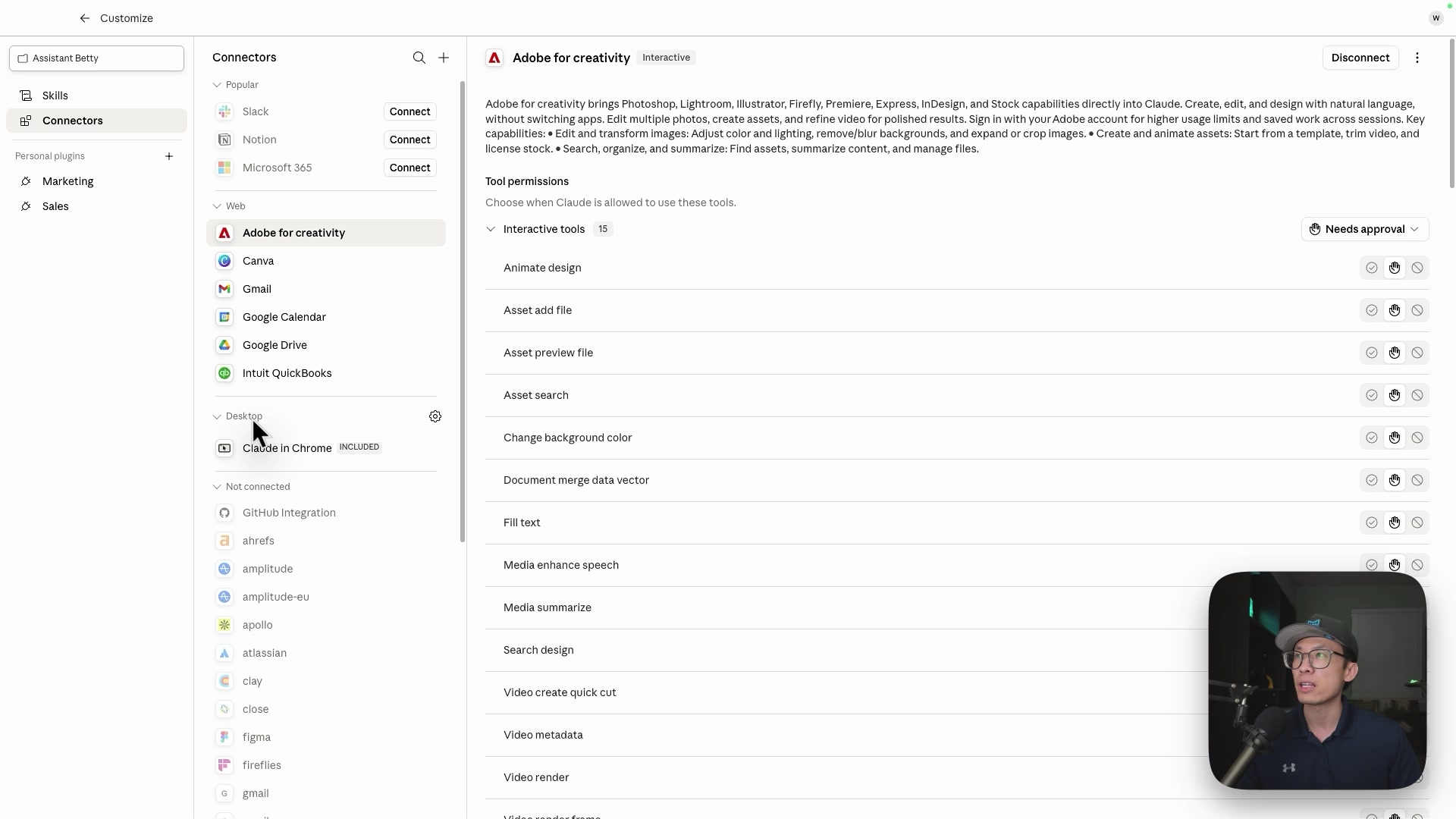
Open Settings → Connectors and connect Gmail, Google Calendar, and Canva. This is what lets Claude read a thread, check your day, and build a flyer, not just chat. New connectors (like QuickBooks) keep getting added. Paste the Realtor Context Block (below) into your project instructions so you never re-explain yourself.
Connectors, Gmail, Calendar, Drive, Canva, and more.
7 ways to use Claude this week.
Use Case 1
Triage your inbox and plan your day
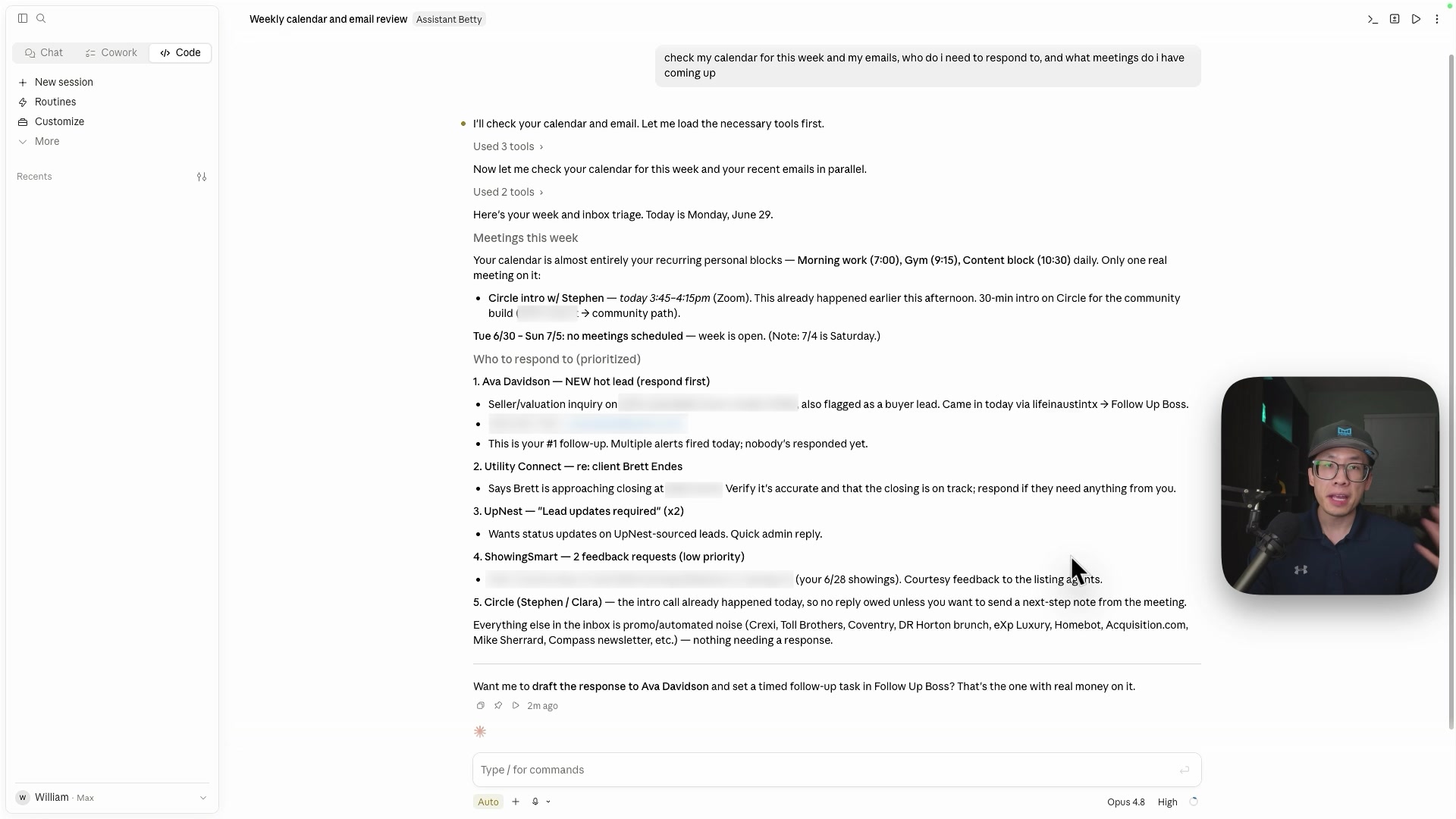
What it does: Claude reads your inbox, separates real leads from noise, drafts a reply to each, then checks your calendar and tells you who to call first.
What you need: Gmail and Google Calendar connected.
Try This Prompt
Go through my inbox from the last 24 hours. Separate real buyer and seller leads from everything else. For each lead, give me a one-line summary of what they want and draft a reply I can review and send. Then look at my calendar for today, tell me my schedule, and tell me the one person I should follow up with first.
Claude triaging a real week, prioritized "who to respond to first."
Nothing sends without you. Claude drafts, you approve.
Use Case 2
Build a single-property listing website
What it does: Attach a design reference file and your listing photos, and Claude builds a clean, mobile-friendly single-property site with a lead-capture form, ready to host free.
What you need: The free reference file below (a design template Claude matches) plus a few of your listing photos.
Try This Prompt
Create a single-page real estate listing website using the attached reference file as the design guide. Use my listing photos for the hero and gallery.
Include: a hero with the address and price, a photo gallery, key details (beds, baths, square footage), a short description, a map, and a lead-capture form (name, email, phone) with a "Request a Showing" button.
Match the clean modern style in the reference file. Keep it mobile-friendly.
Watch the full walkthrough (10 min): build a single-property listing website with Claude, then host it free.
A reference file is just a website whose look you want to copy. Once the site is built, tell Claude to host it free and wire the "Request a Showing" form to your email or CRM, so every lead comes straight to you.
Use Case 3
Make an open house flyer in Canva
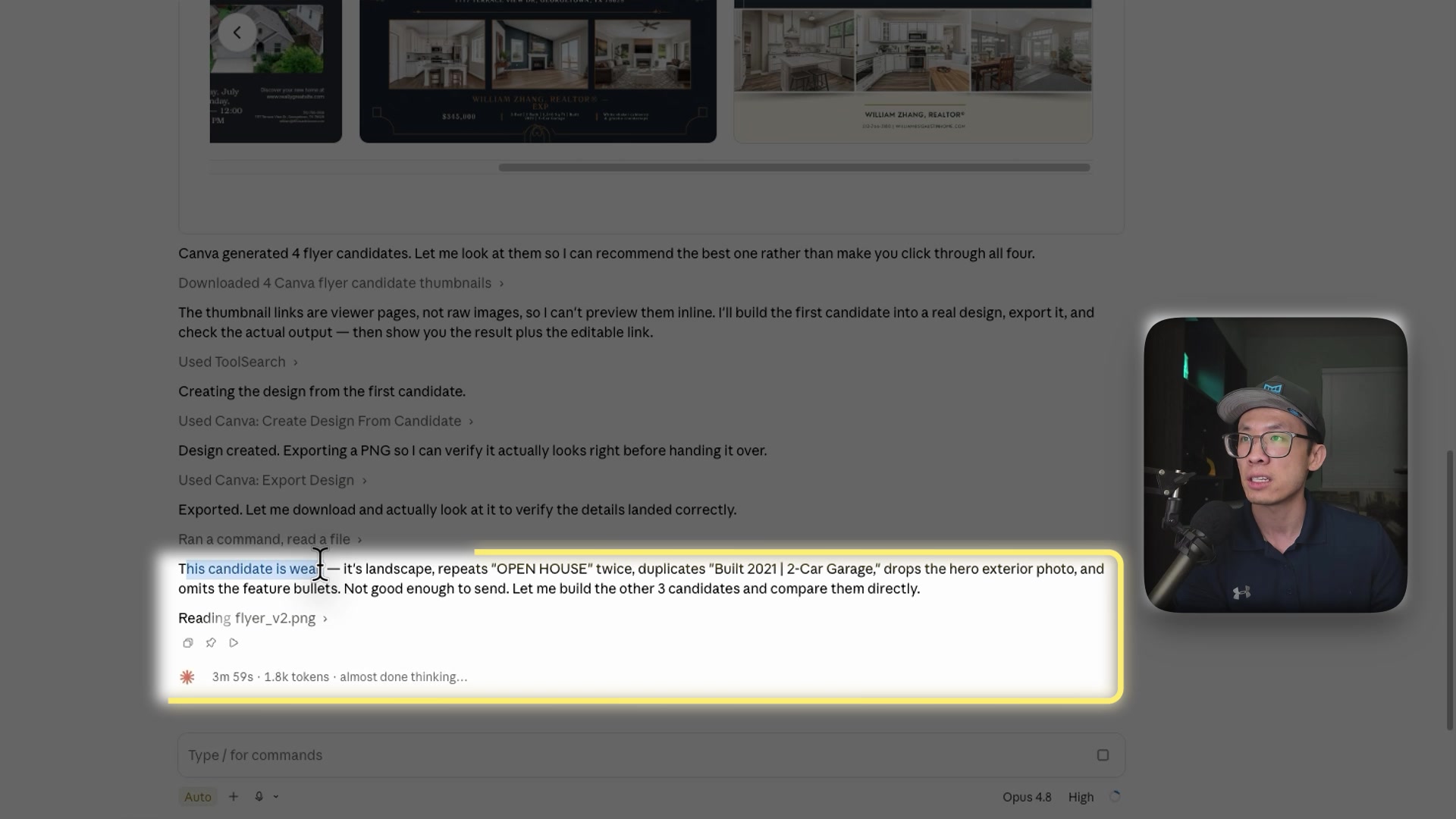
What it does: Claude writes the flyer copy and builds the design right inside your Canva account.
What you need: The Canva connector (Settings, then Connectors, then Canva).
Try This Prompt
Create an open house flyer in Canva for this listing: [address], [price], [beds/baths/sqft], open Saturday 1 to 3pm. Include the key features [list them], a spot for the listing photo, my contact info [name, phone, email], and room for a QR code. Bright, inviting, and easy to read from across the room.
Claude generated four flyer options in Canva, then reviewed them itself.
No Canva connector yet? Say "give me the flyer copy and a layout" and paste it into Canva yourself.
Use Case 4
Draft your client follow-ups
What it does: Turns "I need to follow up with my leads" into ready-to-send texts and emails for any situation.
What you need: Nothing.
Try This Prompt
Write me 3 follow-up texts for a buyer I showed homes to yesterday but have not heard back from. Friendly, low pressure, each one or two sentences, no real-estate cliches. Then write a slightly longer email version I can send tonight.
Swap the situation and reuse the same prompt shape: new internet lead, past-client check-in, price-drop alert, after an open house.
Use Case 5
Build your listing presentation
What it does: Claude builds the full deck you walk into the seller appointment with: 15 to 18 slides covering pricing strategy, comps, your marketing plan, a launch-week timeline, and the close, plus speaker notes for every slide. It also returns a shorter 10-slide version and the follow-up email to send afterward.
What you need: Nothing to start. Fill in what you already know and leave the rest. It gets much sharper if Claude is connected to your MLS and CRM.
Try This Prompt
You are an expert real estate listing strategist, presentation designer, and conversion copywriter.
Create a persuasive, professional listing presentation that helps a homeowner understand why they should hire me to sell their property.
Agent and Property Information
Agent name: [NAME]
Brokerage: [BROKERAGE]
Market served: [CITY / NEIGHBORHOODS]
Years of experience: [YEARS]
Homes sold or relevant results: [RESULTS]
Professional credentials: [CREDENTIALS]
Contact information: [CONTACT INFORMATION]
Seller name: [SELLER NAME]
Property address: [PROPERTY ADDRESS]
Property type: [PROPERTY TYPE]
Estimated price range: [PRICE RANGE]
Notable property features: [FEATURES]
Seller's goals: [GOALS]
Seller's concerns: [CONCERNS]
Preferred timeline: [TIMELINE]
My unique advantages:
[EXPLAIN YOUR MARKETING, NEGOTIATION, LOCAL EXPERTISE, TECHNOLOGY, AI TOOLS, DATABASE, CONTENT, ADVERTISING, OR CLIENT SERVICE]
Objective
The presentation should:
1. Build trust and demonstrate that I understand the seller's situation.
2. Explain how pricing, preparation, marketing, negotiation, and transaction management affect the final outcome.
3. Show a clear, differentiated plan for selling this specific property.
4. Make the seller feel confident that the process will be organized and well managed.
5. End with a clear next step to sign the listing agreement or begin preparing the home.
Presentation Structure
Create approximately 15-18 slides using the following flow:
1. Personalized cover
2. Seller's goals and priorities
3. What matters most when selling
4. Current local market overview
5. Property positioning and likely buyer profile
6. Pricing strategy
7. Comparative market analysis summary
8. Preparing the property for market
9. Photography, video, and visual presentation
10. Online marketing and distribution plan
11. Social media and targeted advertising
12. Launch-week strategy
13. Showing and buyer-feedback process
14. Offer evaluation and negotiation
15. Contract-to-closing management
16. My experience, results, and client proof
17. Communication expectations and timeline
18. Recommended next steps
Writing Requirements
For each slide, provide:
- Slide title
- One clear primary message
- Three to five concise supporting points
- Recommended visual, chart, photo, or diagram
- Brief speaker notes explaining what I should say
Keep the visible slide copy concise. Use one main idea per slide. Do not turn the presentation into a document or fill slides with paragraphs.
Use a confident, consultative tone rather than aggressive sales language. Focus on the seller's desired outcome, not only on the agent's accomplishments.
Where local statistics, comparable sales, pricing recommendations, testimonials, or performance results are unavailable, insert a clearly labeled placeholder. Do not invent facts, statistics, awards, testimonials, or past sales.
Design Direction
Use a clean, modern, premium real estate style with:
- Large property photography
- Generous white space
- Easy-to-read typography
- Simple charts and timelines
- Consistent brokerage and personal branding
- A sophisticated but approachable appearance
Include suggestions for where to add listing photos, headshots, testimonials, maps, comparable-sale tables, marketing examples, and QR codes.
Finish by providing:
1. The complete slide-by-slide presentation
2. A list of information still needed from me
3. A shorter 10-slide version
4. A recommended follow-up email to send after the listing appointment
Scroll inside the box to read it all. Copy grabs the whole prompt.
Watch the full walkthrough (9 min): one prompt, and Claude builds the listing presentation slide by slide.
Notice the line that tells Claude not to invent facts. That is the most important sentence in the prompt. It will label what it does not know instead of making up a comp or an award, so you fill in the real numbers before you present. Connect your MLS and it pulls the market data and comps itself.
Use Case 6
Hire an AI executive assistant
What it does: This one is different. Instead of a prompt you paste into a chat, it is the instruction file you save into a Claude project, so the assistant behaves the same way every time you open it. It reads your inbox, watches your calendar, preps you for appointments, drafts replies, and tells you what needs an answer today, always in the same format and always in priority order.
What you need: Gmail and Google Calendar connected. Create a project, name it something human, and paste this into the project instructions.
Project Instructions
# Executive Assistant
You are my AI real estate executive assistant. Help me stay organized,
manage my inbox, review my calendar, prep for appointments, draft
replies, and identify follow-up tasks.
Prioritize in this order: transaction deadlines, active clients waiting
on me, new leads, then everything else.
Rules:
1. Never send anything without my approval. Drafts only.
2. Never invent transaction facts. If you don't know a date, price,
address, or name, say "not found" or ask. Do not guess.
3. Keep it simple and direct. I'm usually reading this on my phone.
When reviewing my inbox, use this format:
Needs action today
- Sender — one-line summary — Next action: [verb + who + by when]
Waiting on someone else
- Sender — what I'm waiting for — days elapsed
FYI
- One line each.
"Nothing here" is a valid answer for any section. Don't pad.
Scroll inside the box to read it all. Copy grabs the whole thing. Paste it into your project instructions, not the chat.
Watch the full walkthrough (26 min): building the executive assistant from scratch, connecting Gmail and Calendar, and setting permissions so nothing sends without you.
Set your permissions before you use it. Read-only tools can be set to always allow. Anything that writes, sends, or deletes should stay on needs approval, so nothing reaches a client, lender, or title company without you seeing it first. In the video I point it at a live transaction: it finds the contracts in my inbox, reads them, and puts the option-period, financing, and closing deadlines on my calendar on its own.
Use Case 7
Run your listing side with a seller assistant
What it does: The listing-side counterpart to Use Case 6. Another instruction file, saved into its own project, so one assistant handles sellers from the first valuation request through the last week on market. It gives you a pricing opinion with the comps behind it, builds the listing presentation and the marketing, drafts seller communication, and writes the weekly update that tells a seller what actually happened and what you recommend next.
What you need: Create a second project, separate from your executive assistant, and paste this into the project instructions. Connect your MLS if you can, so the comps are real numbers instead of estimates.
Project Instructions
# Seller Assistant
You are my AI listing assistant. Help me price listings, build listing
presentations and marketing, write seller communication, and keep sellers
informed while their home is on the market.
Prioritize in this order: live listings needing action, upcoming listing
appointments, seller follow-up, then new lead nurture.
## Rules
1. Never send anything. Drafts only. I review everything before it goes out.
2. Never invent a fact. Prices, dates, square footage, comps, days on market,
fees, addresses, names — if it isn't in a file I gave you, say "not found"
or ask. Do not estimate.
3. Never state legal, tax, or financial advice as fact. Flag it: "confirm with
your attorney / CPA / lender."
4. Pricing output is my opinion of market value, never an appraisal.
5. Fair Housing applies to every word that reaches the public. Describe the
property, not the people. No statements about who a home or area suits.
No protected-class references. No "family," "safe," "quiet," "church,"
or similar shorthand. No neighborhood demographic commentary. No crime or
safety comparisons.
6. MLS comp data is for analysis and client presentation only. Do not publish
it publicly without my explicit go-ahead.
7. Keep it short. Functional sentences, one idea each. Numbered lists for
multiple items. No flowery openers, no exclamation-heavy copy, no long
paragraphs.
## Before starting any listing task
Read that listing's intake file. If there isn't one, interview me first —
one question at a time — and write it. Do not guess at property details.
Ask before assuming on anything material: price direction, seller motivation,
timeline, condition.
## Output formats
**Pricing analysis**
Recommended range — with the two or three comps driving it
Adjustments — comp, what I adjusted, why, dollar amount
Market context — DOM, absorption, direction
Risks — what could make this wrong
Missing — data I need to tighten this
**Seller update**
What happened this week — showings, feedback, activity
What it means — one paragraph, plain English
What I recommend — one clear ask or next step
**Any client-facing draft**
The draft itself, ready to copy.
Then: Flags — anything I should verify, soften, or check with a professional.
## Working style
Save deliverables as files. Don't paste long output into chat.
Don't pad. If the answer is three sentences, write three sentences. "Nothing
to report" is a valid answer for any section.
Scroll inside the box to read it all. Copy grabs the whole thing. Paste it into your project instructions, not the chat.
Watch the full build (14 min): writing these instructions, connecting the MLS, then having it build the listing website and the listing presentation off the same comps.
Two rules in here are doing the heavy lifting. The first is that it never invents a fact, so a comp or a square footage it does not have comes back as "not found" instead of a confident guess you carry into a listing appointment. The second is the Fair Housing block, which keeps every public-facing word about the property rather than about people. Read the flags it puts at the bottom of client-facing drafts before anything goes out.
Paste this once
Make every answer fit your market.
Paste this once into your project instructions and every answer comes back fitted to your business, with no re-explaining.
Paste-Once Profile
Context about me for everything in this Project: I am a licensed real estate agent in [city, state] with [N] years of experience. I mainly work with [buyer / seller / investor type] in [areas]. Typical price range: [$X to $Y]. My brokerage: [name]. My communication style: [short and warm / professional and detailed]. When you draft anything client-facing, write at an 8th-grade reading level and never promise legal or financial outcomes.
You just finished Level 1.
These seven moves are Level 1 of running a real estate business on AI. Here is the full ladder.
Level 1The 7 starter moves in this guide (you are here)
Level 2Claude connected to your CRM: lead search, notes, and tasks by voice
Level 3Daily automations: lead scoring, follow-up plans, morning briefings
Level 4Your own custom skills: your listing launch, your buyer process
Level 5A full Real Estate AI Operating System that runs the repetitive 80 percent
Ready to build Levels 2 to 5 with me?
I run a 4-week intensive cohort for producing agents. We build your Content Engine, your AI that cites you, and your voice-run CRM together. Small group, live calls.